First exercise: reasoning about one municipality
Learning objective
Go from a place on the map to an evidence-based question about its finances, and see what the platform can and cannot tell you.
This exercise uses the municipal finance workflow because it runs on live, official National Treasury records rather than demo figures. You will choose a place, read its evidence, frame a question, test options and interpret the result.
Before you start
- None. Internet access is needed because Treasury figures are fetched live (this can take up to about a minute).
Step by step
- 1Open Global Market Access and choose a municipal finance metric. Select South Africa, explore subnational areas and click a municipality, for example the City of Cape Town (code CPT). Open →
- 2Open its municipal profile. Read the retrieval time and the source endpoint shown with the figures — these tell you how current and where from. Open →
- 3Inspect the evidence: revenue mix, committed versus discretionary spending, and fiscal ratios. Press “Why?” wherever it appears to see status and methodology.
- 4Frame a development question, for example: “How much room does this council have to fund more basic services without new borrowing?”
- 5Use the allocation sliders and revenue optimiser on the same page. Note that committed items (salaries, debt, bulk purchases) cannot be reallocated and reallocation is capped at 10% of discretionary spending.
- 6Check the Connections page for the same municipality to see which province oversees it and which grants reach that province. Open →
- 7Keep four terms apart: an allocation is a legal amount assigned (e.g. by the Division of Revenue Act); a receipt is money actually received; available budget capacity is the arithmetic room in a budget; spendable funds are what can lawfully and practically be spent now (after commitments, grant conditions, cash and approval). The profile shows income and expenditure records — none of the other three.
- 8If the figures are slow, wait — nothing is filled in meanwhile. If they fail, press “Try again” or pick another year. You can return here at any time with the link on the loading message.
- 9Decide a next step: take a project concept to the Scenario Lab, or note which missing data (for example ward-level outcomes) you would need before advising.
What it looks like
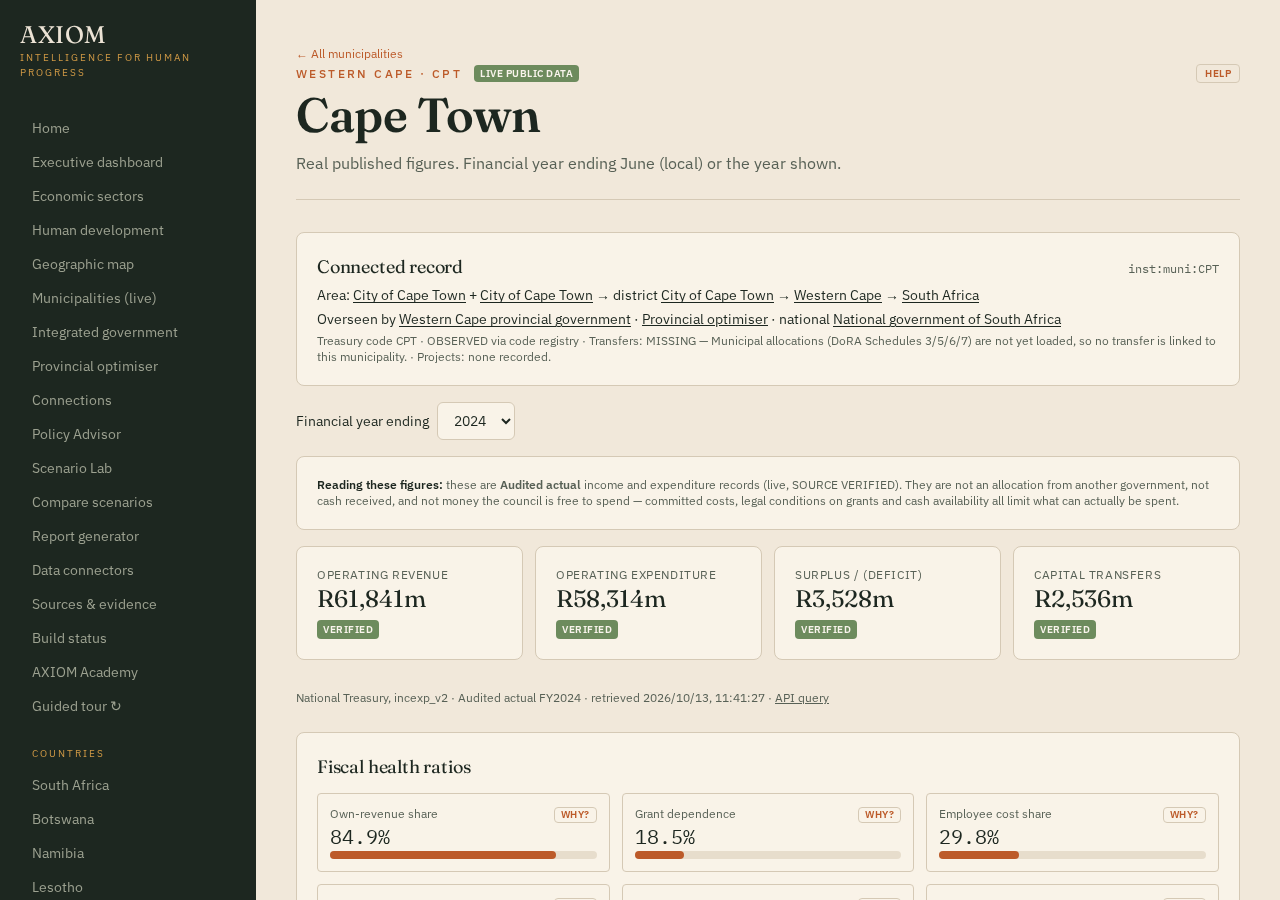
- “Live public data” label: figures come from National Treasury, not demo values.
- Financial-year selector: pick the reporting period.
- Source line under the figures: dataset, amount type, year, retrieval time and the exact API query.
- “Reading these figures” note: records are not allocations, receipts or spendable funds.
Example
If a municipality runs a deficit, the reallocation controls are switched off. That is not a bug: the platform refuses to move money that does not exist.
What the result means
The result shows what is arithmetically possible within the recorded budget. It does not show what is politically, legally or administratively feasible, and it does not predict human welfare outcomes.
Limitations and common mistakes
- Treasury figures are budget and audited records, not measures of service quality.
- Missing figures are shown as missing, never as zero.
- Revenue opportunities and project concepts use user-input placeholders until feasibility figures are supplied.
- The exchange rate used for US$ conversions (R18.5) is an estimate.
Check your understanding
Optional and not scored — pick an answer to see the explanation.